Webhook Notifications
Webhook notifications allow your application to receive real-time updates from PayOnUs about payment events. Configure a publicly accessible HTTPS endpoint on your server to receive these notifications.
Event Types
- COLLECTION
- PAYOUT
Request Headers
- Content-Type:
text/plain— webhook payloads are delivered as plain text. Parse the body as JSON after receiving it. - hash: Hex-encoded SHA-256 hash used to verify the payload integrity and authenticity.
Sample Payloads
{
   "id": "xxx-xxx-xxx",
   "type": "COLLECTION",
   "message": null,
   "currency": "NGN",
   "sessionId": "1000042601010101014321xxxxx",
   "businessId": "xxx-xxx-xxx",
   "merchantFee": 50,
   "accountNumber": "6012343210",
   "onusReference": "ONUS-NUB-xxxx-01012026-010101",
   "paymentStatus": "SUCCESSFUL",
   "senderDetails": {
       "name": "JOHN SMITH",
       "bankCode": "100004",
       "bankName": "OPAY",
       "accountNumber": "8012345678"
   },
   "paymentChannel": "BANK_TRANSFER",
   "merchantReference": "mtx-20260101-010101",
   "providerReference": "1000042601010101014321xxxxx",
   "transactionAmount": 50000,
   "merchantCheckoutReference": null
}
{
   "id": "xxx-xxx-xxx",
   "type": "COLLECTION",
   "message": null,
   "currency": "NGN",
   "sessionId": "100004260430172326158xxxxx",
   "businessId": "xxx-xxx-xxx",
   "merchantFee": 20,
   "accountNumber": "602194xxxx",
   "onusReference": "ONUS-FNUB-xxxx-30042026-195331",
   "paymentStatus": "SUCCESSFUL",
   "senderDetails": {
       "name": "JOHN SMITH",
       "bankCode": "100004",
       "bankName": "OPAY",
       "accountNumber": "8012345678"
   },
   "paymentChannel": "BANK_TRANSFER",
   "merchantReference": "ONUS-FNUB-xxxx-30042026-195331",
   "providerReference": "100004260430172326158xxxxx",
   "transactionAmount": 14000,
   "merchantCheckoutReference": null,
   "fixedAccountId": xxx-xxx-xxx,
   "fixedAccountMerchantReference": "mvt-20260101_001",
}
{
     "id": "xxx",
     "type": "PAYOUT",
     "currency": "KES",
     "sessionId": null,
     "businessId": "xxx-xxx-xxx-xxx-xxx",
     "merchantFee": 5.00,
     "accountNumber": "25412341234",
     "onusReference": "ONUS-TRNF-1234567890123-01012025-010101",
     "paymentStatus": "SUCCESSFUL",
     "paymentChannel": "MOBILE_MONEY",
     "merchantReference": "xxx",
     "providerReference": null,
     "transactionAmount": 200.00,
     "merchantCheckoutReference": null
}
{
   "id": "xxx-xxx-xxx",
   "type": "COLLECTION",
   "message": "Link Generated and Awaiting Provider's Feedback",
   "currency": "ZAR",
   "sessionId": null,
   "businessId": "xxx-xxx-xxx",
   "merchantFee": 4.0,
   "accountNumber": "N/A",
   "onusReference": "ONUS-EFT-xxx-01012026-010110",
   "paymentStatus": "SUCCESSFUL",
   "senderDetails": {
       "name": null,
       "bankCode": "N/A",
       "bankName": null,
       "accountNumber": null
   },
   "paymentChannel": "EFT",
   "merchantReference": "mtx-eft-20260101-010110",
   "providerReference": null,
   "transactionAmount": 100,
   "merchantCheckoutReference": null
}
Field Descriptions
- id: Unique identifier for the webhook event.
- type: Event type. One of COLLECTION or PAYOUT.
- currency: ISO 4217 currency code of the transaction.
- sessionId: Optional session identifier (may be null).
- businessId: Identifier of the business receiving the event.
- merchantFee: Fee charged to the merchant for the transaction.
- accountNumber: Destination or source account (e.g., phone number for mobile money).
- onusReference: PayOnUs transaction reference for idempotency and reconciliation.
- paymentStatus: Current status of the transaction (e.g., SUCCESSFUL, FAILED, PENDING).
- paymentChannel: Channel used (e.g., MOBILE_MONEY, CARD, BANK).
- merchantReference: Your internal reference for the transaction.
- providerReference: Upstream provider reference (may be null).
- transactionAmount: Transaction amount.
- merchantCheckoutReference: Checkout reference if applicable (may be null).
- fixedAccountId: ID of the fixed account the account number belongs to, if applicable (may be null).
- fixedAccountMerchantReference: Merchant Reference of the fixed account the account number belongs to, if applicable (may be null).
Verifying Webhook Signatures
Always verify incoming webhooks to ensure they originate from PayOnUs and were not tampered with.
- Retrieve the verification key from Merchant Dashboard → Settings → API. If absent, generate a new one.
- Build the verification string by concatenating the following fields from the JSON payload in this exact order (no delimiters):
- accountNumber
- onusReference
- paymentStatus
- verificationKey (from the dashboard)
- Compute the SHA-256 hash of the resulting string.
- Compare the computed hex-encoded hash with the value in the
hashheader using a constant-time comparison.
Pseudocode:
body = parse_json(request.body)
verification_string = body.accountNumber + body.onusReference + body.paymentStatus + VERIFICATION_KEY
computed = sha256_hex(verification_string)
if constant_time_equals(computed, request.headers["hash"]) then
  // accept and process
else
  // reject with 400
end
Setting up webhook details
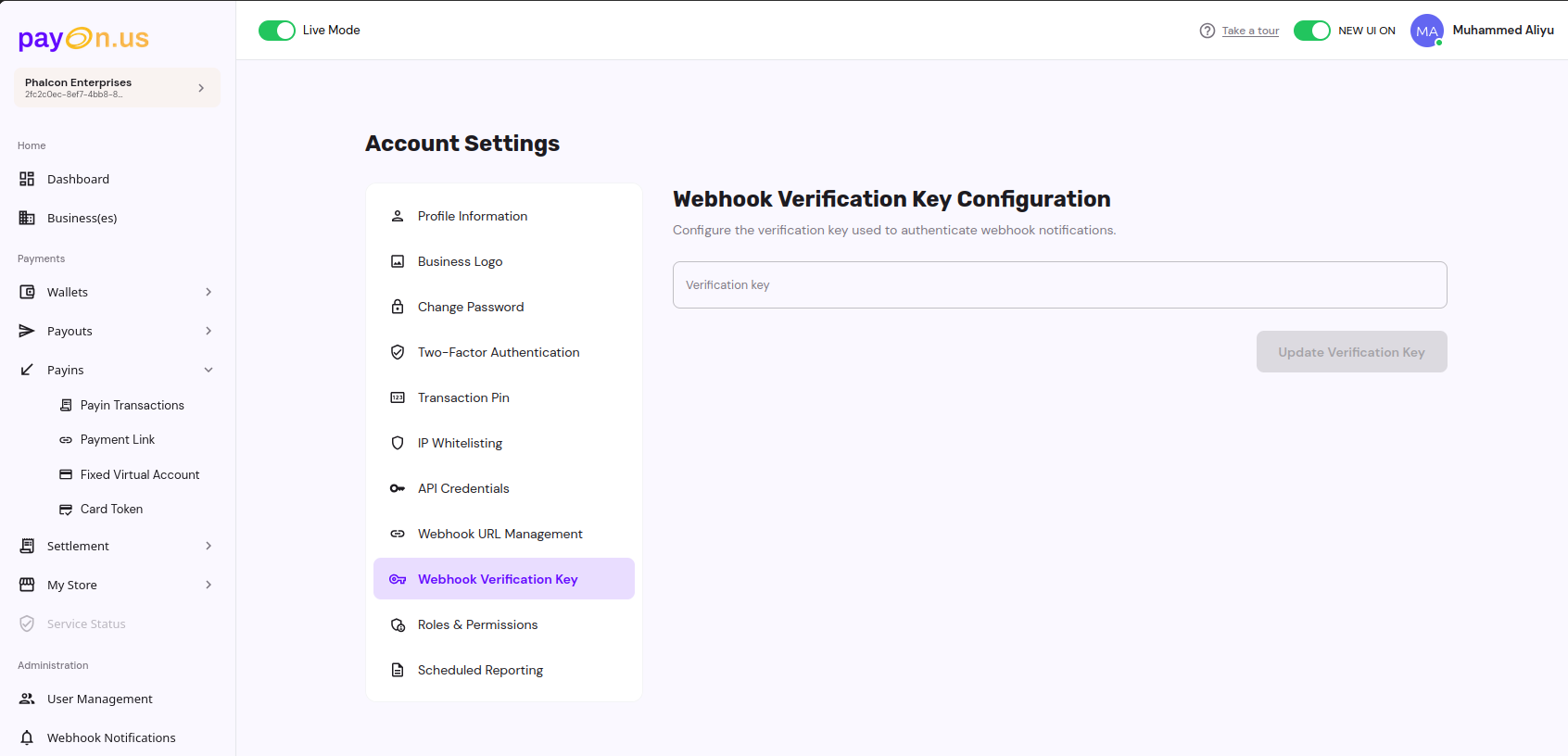
Before you can receive notifications, you are required to set the following via the Merchant Dashboard: - Webhook URL - Webhook Verification Key
You'll need to set these before you can received webhook notifications. You can use the Test Mode toggle to switch between environments.
Here are screenshots for the relevant pages:
- 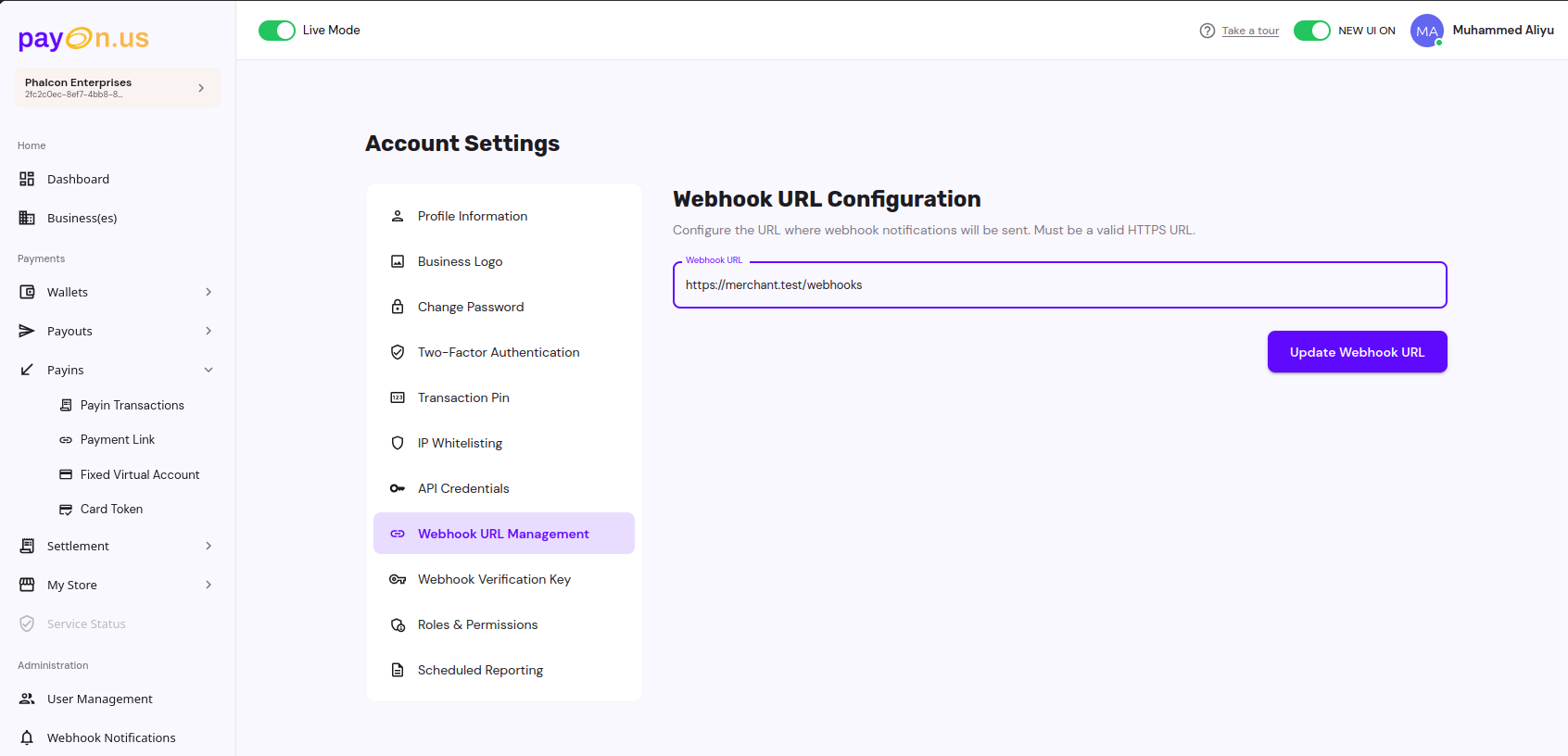 -
- 
Handling Webhooks
- Respond with HTTP 200 as quickly as possible (within 5 seconds). Defer heavy work to background jobs.
- Implement idempotency using the onusReference to avoid double-processing.
- Log and store received events for audit and retries.
- Only trust data after successful signature verification.
Testing
- Use the sandbox environment to simulate events and validate your endpoint behavior. See Guide
For general setup instructions, see API Integration under Getting Started.