Payment Links
Our Payment Link feature allows merchants to generate a checkout link which can be used to receive payments your customers. This feature is only available via the Merchant Dashboard.
Create Payment Link - Merchant Dashboard
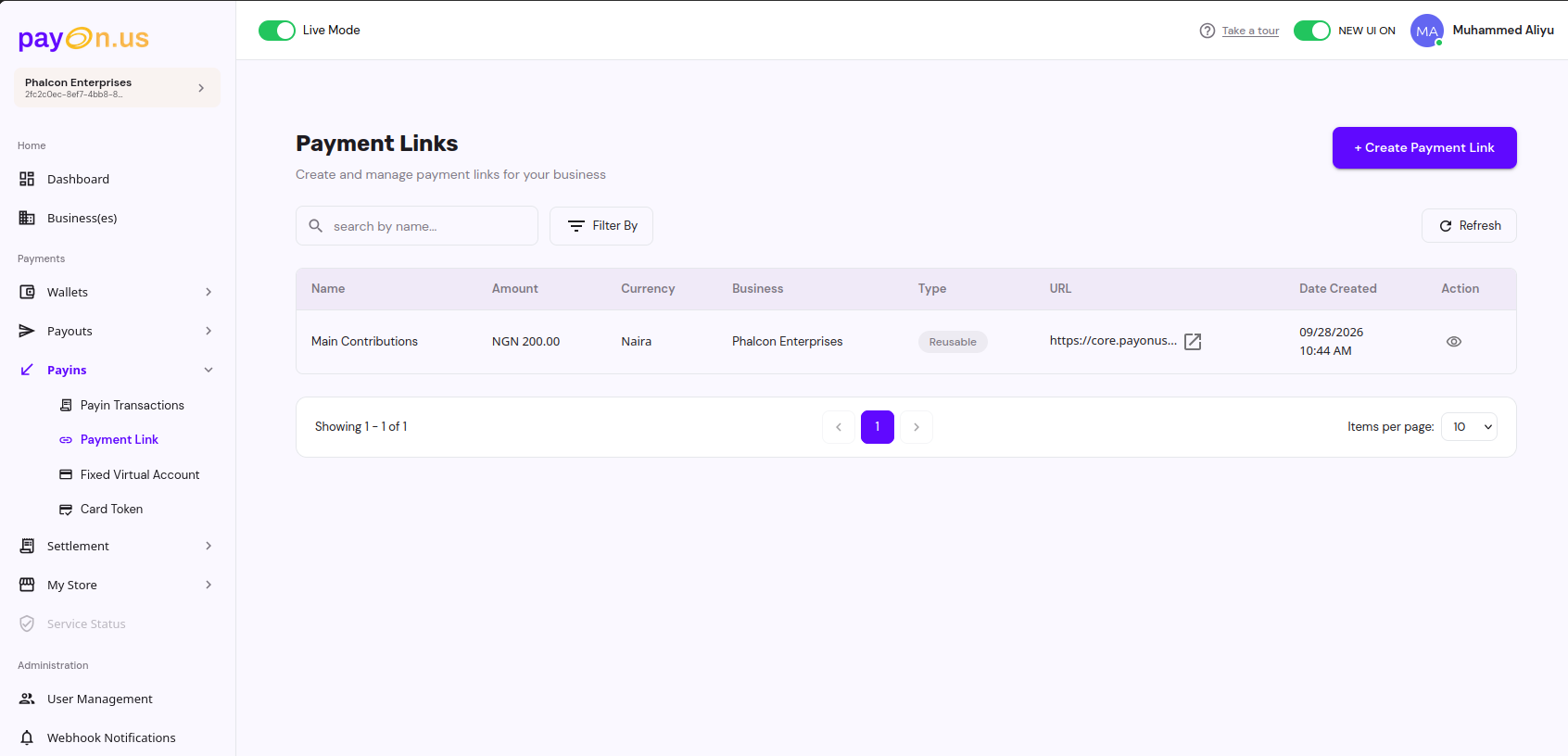
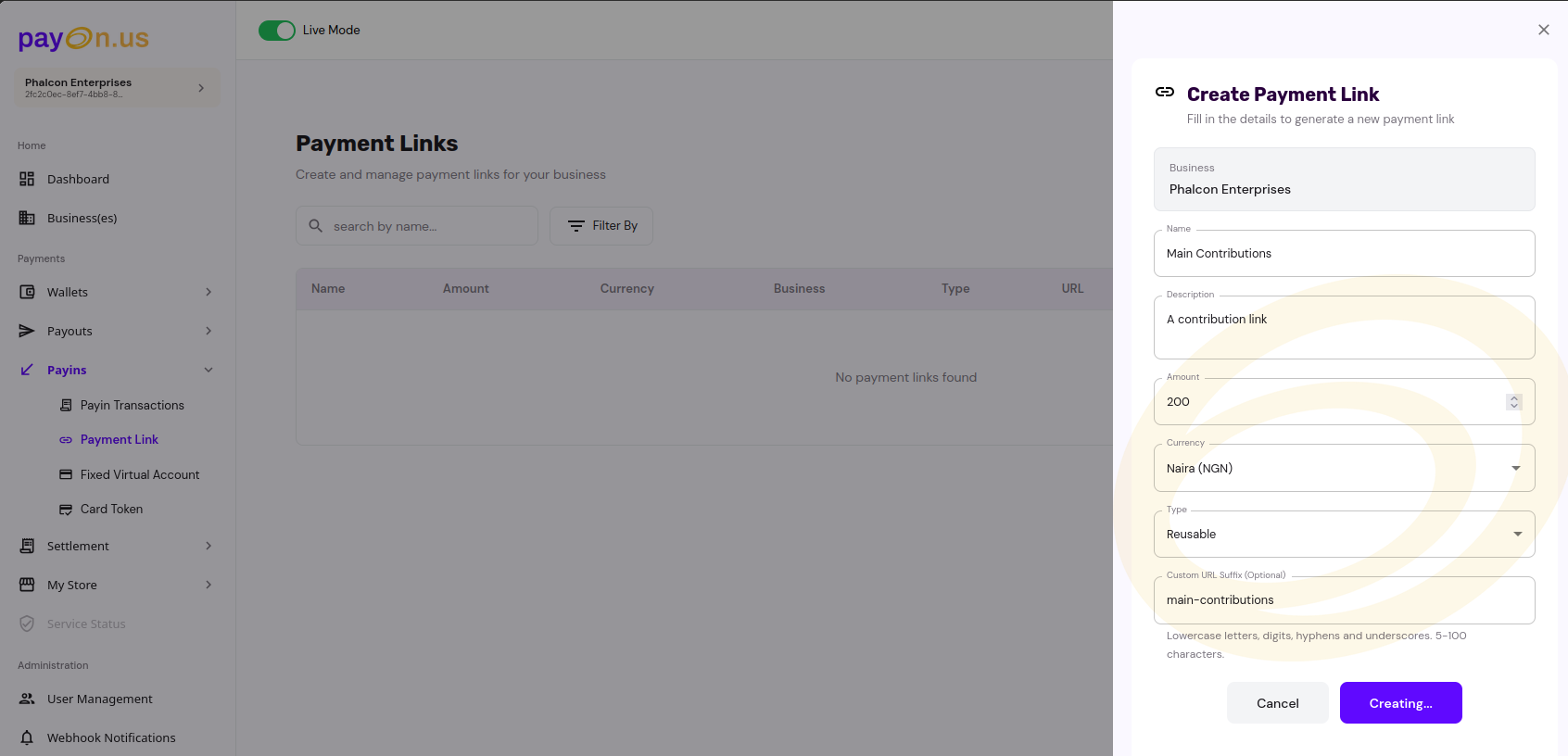
Create Payment Link - API
Request
Required Parameters
| Parameter | Type | Description |
|---|---|---|
| name | string | Name of the Payment Link |
| description | string | Description of the Payment Link |
| businessId | string | Your Business ID |
| amount | double | Amount to be charged from the customer |
| isOneOff | boolean | Determines if a link can be reused or not |
| currency | string | Currency code |
| paymentLinkAmountType | string | How the amount is interpreted: STATIC, DYNAMIC, TARGET, or OPEN |
| paymentLinkPaymentType | string | The reuse behaviour of the link: ONE_TIME, MULTI_USE, or COLLECTIVE |
| notificationUrl | string | Optional notification URL for webhook notifications |
| customisedUrlSuffix | string | Optional. A custom suffix for your payment link URL |
| paymentLinkPaymentMethods | array | Optional. Restrict the link to a subset of payment methods: CARD, BANK_TRANSFER, PAY_WITH_WALLET. Defaults to every method currently activated for your business if omitted |
Sample Request / Response
- Path:
/api/v1/payment-links - Method: POST
-
Request Body:
{ "name": "Test Payment", "description": "Payment Link Test", "businessId": "{business_id}", "amount": 5000, "currency": "NGN", "isOneOff": true, "paymentLinkAmountType": "STATIC", "paymentLinkPaymentType": "ONE_TIME", "customisedUrlSuffix": "test-merchant", "notificationUrl": "https://webhook.site/xxx-xxx-xxx", "paymentLinkPaymentMethods": ["CARD", "BANK_TRANSFER"] } -
Response Body:
{
  "status": 200,
  "message": "Success",
  "data": {
    "id": "xxx-xxx-xxx",
    "name": "Test Payment Again",
    "description": "Payment Link Test",
    "customisedUrlSuffix": "test-merchant",
    "businessId": "xxx-xxx-xxx",
    "amount": 5000,
    "currency": "NGN",
    "url": "https://core-sandbox.payonus.com/payments/test-merchant",
    "paymentMethods": ["CARD", "BANK_TRANSFER"],
    "status": "OPEN",
    "amountType": "STATIC",
    "paymentType": "ONE_TIME",
    "createdDate": "2025-10-24 08:38:11",
    "businessName": null,
    "merchantName": null,
    "oneOff": true
  }
}
Notes
- You can set whether the payment link is one-time or recurring (reusable).
- You will receive a webhook notification when a payment via the payment link
paymentLinkPaymentTypemust beONE_TIMEwhenisOneOffistrue, and must not beONE_TIMEwhenisOneOffisfalse.amountmust be greater than0whenpaymentLinkAmountTypeisSTATICorTARGET, and must be exactly0when it isDYNAMICorOPEN.- If
paymentLinkPaymentMethodsis omitted, the link accepts every payment method currently activated for your business in that currency. Requesting a method your business hasn't activated fails with400 Bad Request. - Your business must have at least one payment method activated for the given currency, or the request fails with
400 Bad Request.
List / Search Payment Links
Required Query Parameters
| Parameter | Type | Description |
|---|---|---|
merchantId |
string (UUID) | Your merchant ID |
Optional Query Parameters
| Parameter | Type | Description |
|---|---|---|
businessIds |
string | Comma-separated business IDs to filter by. Must all belong to your merchant. Defaults to all your businesses if omitted |
id |
string (UUID) | Filter to a specific payment link ID |
name |
string | Filter by the payment link's name |
currency |
string | Currency code |
createdFrom / createdTo |
string (date) | Filter by creation date range, e.g. 2025-01-01 |
pageNo |
number | Page number (default 1) |
pageSize |
number | Page size (default 30) |
Sample Response
{
  "status": 200,
  "message": "Success",
  "data": {
    "pageNo": 1,
    "pageSize": 30,
    "lastPage": 1,
    "totalNumberOfItems": 1,
    "content": [
      {
        "id": "xxx-xxx-xxx",
        "name": "Test Payment",
        "description": "Payment Link Test",
        "customisedUrlSuffix": "test-merchant",
        "businessId": "xxx-xxx-xxx",
        "amount": 5000,
        "currency": "NGN",
        "url": "https://core-sandbox.payonus.com/payments/test-merchant",
        "paymentMethods": ["CARD", "BANK_TRANSFER"],
        "status": "OPEN",
        "amountType": "STATIC",
        "paymentType": "ONE_TIME",
        "createdDate": "2025-10-24 08:38:11",
        "businessName": "Test Business",
        "merchantName": "Test Merchant",
        "oneOff": true
      }
    ]
  }
}
Deactivate Payment Link
Permanently stops a payment link from accepting further payments. This cannot be undone - once deactivated, the link must be recreated if you need a new one.
Path Parameters
| Parameter | Type | Description |
|---|---|---|
businessId |
string (UUID) | The business the payment link belongs to |
id |
string (UUID) | The payment link ID to deactivate |
No request body is required.
Sample Request / Response
- Path:
/api/v1/payment-links/business/{business_id}/{payment_link_id}/deactivate -
Method: POST
-
Response Body:
{
  "status": 200,
  "message": "Success",
  "data": {
    "id": "xxx-xxx-xxx",
    "name": "Test Payment",
    "description": "Payment Link Test",
    "customisedUrlSuffix": "test-merchant",
    "businessId": "xxx-xxx-xxx",
    "amount": 5000,
    "currency": "NGN",
    "url": "https://core-sandbox.payonus.com/payments/test-merchant",
    "paymentMethods": ["CARD", "BANK_TRANSFER"],
    "status": "CANCELLED",
    "amountType": "STATIC",
    "paymentType": "ONE_TIME",
    "totalPaidAmount": 0,
    "paymentCount": 0,
    "createdDate": "2025-10-24 08:38:11",
    "businessName": "Test Business",
    "merchantName": "Test Merchant",
    "oneOff": true
  }
}
Notes
- Deactivating sets
statustoCANCELLEDandexpiryDateto the current time. - Fails with
409 Conflict("Payment link is already \<status>") if the link is alreadyCLOSED,CANCELLED, orEXPIRED. - Fails with
400 Bad RequestifbusinessIddoes not match the payment link's business.